

Let me rephrase…
I’m finally LEARNING Illustrator. But even after picking up the basics, I feel like I’ve grown leaps and bounds in the program. It doesn’t feel scary or overwhelming to navigate around. And if you remember that I’ve been using—(cough)—Microsoft Word to create all my graphics, well you know how excited I am to make a simple graphic like this for an upcoming girls trip with my sisters and cousins, and have it come together in just a few minutes:
Yay!
I’m definitely still a beginner. But I’ll tell you how I got to this point…AND how you can learn Illustrator too. We’ve got an awesome giveaway at the end of my ramblings. Read on….
A couple months ago I was contacted by the ladies at Nicole’s Classes, asking if I wanted to take their Illustrator course. Yes please!

I took the Illustrator 101 course, which lasts for 4 weeks, with instructor Alma Loveland. It was awesome! And she was awesome—she has the most soothing voice (that alone is worth taking the course, right?)
If you’ve never heard of Nicole’s classes, definitely click over because they offer tons of creative courses aside from Illustrator, like Photoshop, InDesign, Photography, creating a Brand, typography, and other cool classes.
In four weeks, Alma takes you from the very basics to more detailed tools and applications. And I loved her basics because it helped me understand the concept behind Illustrator before jumping into the tools. I had that ah-ha moment when she explained why vector graphics (on the left below) are different from raster graphics (such as photos/jpgs, on the right)

I’m a big believer that understanding concepts first, leads to better application.
Here’s a turtle that Alma breaks down in the first lesson to explain the many layers and shapes that create one Illustrator object.

Throughout the 4 week course, she explains all the various tools, options, color palettes, brushes, how to make a custom brush, symbols, the pen tool. Oh the pen tool! She goes over Live Trace and Live Paint which are really cool. She’s using it below for this seagull:

She really wowed me by using invisible lines in Live Paint to create this cool seascape effect on the words:

Never would have thought to do that.
I guess that’s why she’s awesome and teaching the course, and assigning homework, and providing feedback each week to each student.
So here’s some of the stuff I tried.
The first week we made a typographic poster. And since it was near Father’s Day I did a nod to one of Casey’s favorite movies, Anchor Man:

I originally planned to print and frame these for his office, but haven’t made it that far yet.
This next graphic was inspired by 5 year-old Owen. He loves the Coldplay song Paradise and when we chose Clara’s name a year and half ago, we thought Paradise could be turned into Claradise. So now we sing the chorus that way. I think she’s singing along.

I never mailed an official baby announcement when she was born, but I can see how easy it is to make announcements and Christmas cards on your own in Illustrator. Too late to welcome friends and family to Claradise?
On Saturday I used Illustrator in a funny way….to help me make a new-home decision! I’ve been going back and forth on the bathroom tile colors and design. So I thought duh, I should do a mock up of the colors so Casey and I can visualize it better. Just another reason to love Illustrator. Subway tiles.
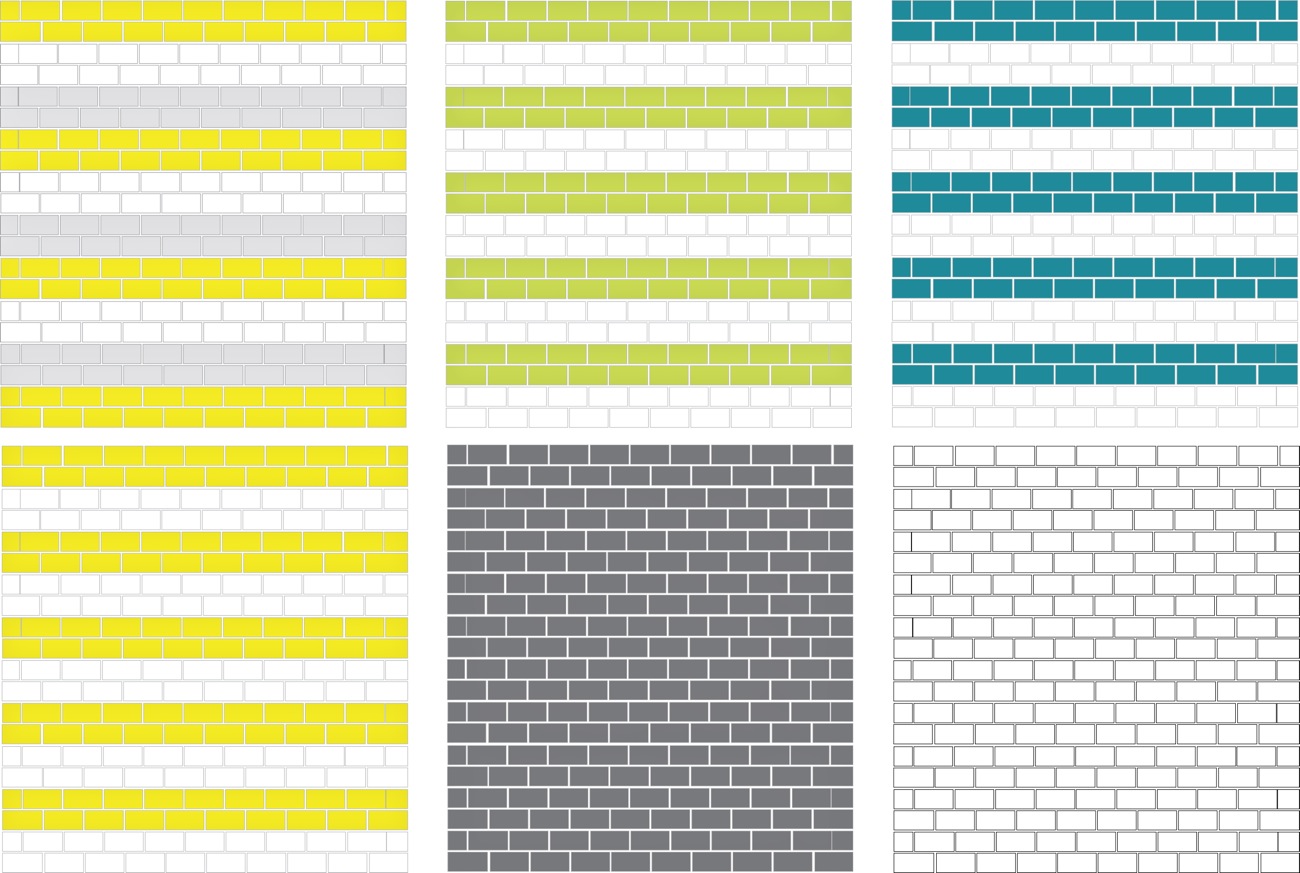
Then I got real fancy and made a mockup of an actual bathroom, practicing all the shapes I’d learned.

And when I couldn’t remember how to do a cut-out circle inside of another circle, I was able to reference it in the Illustrator book too. I should note that the book is not included in the course, but it’s super reasonably priced and worth it.
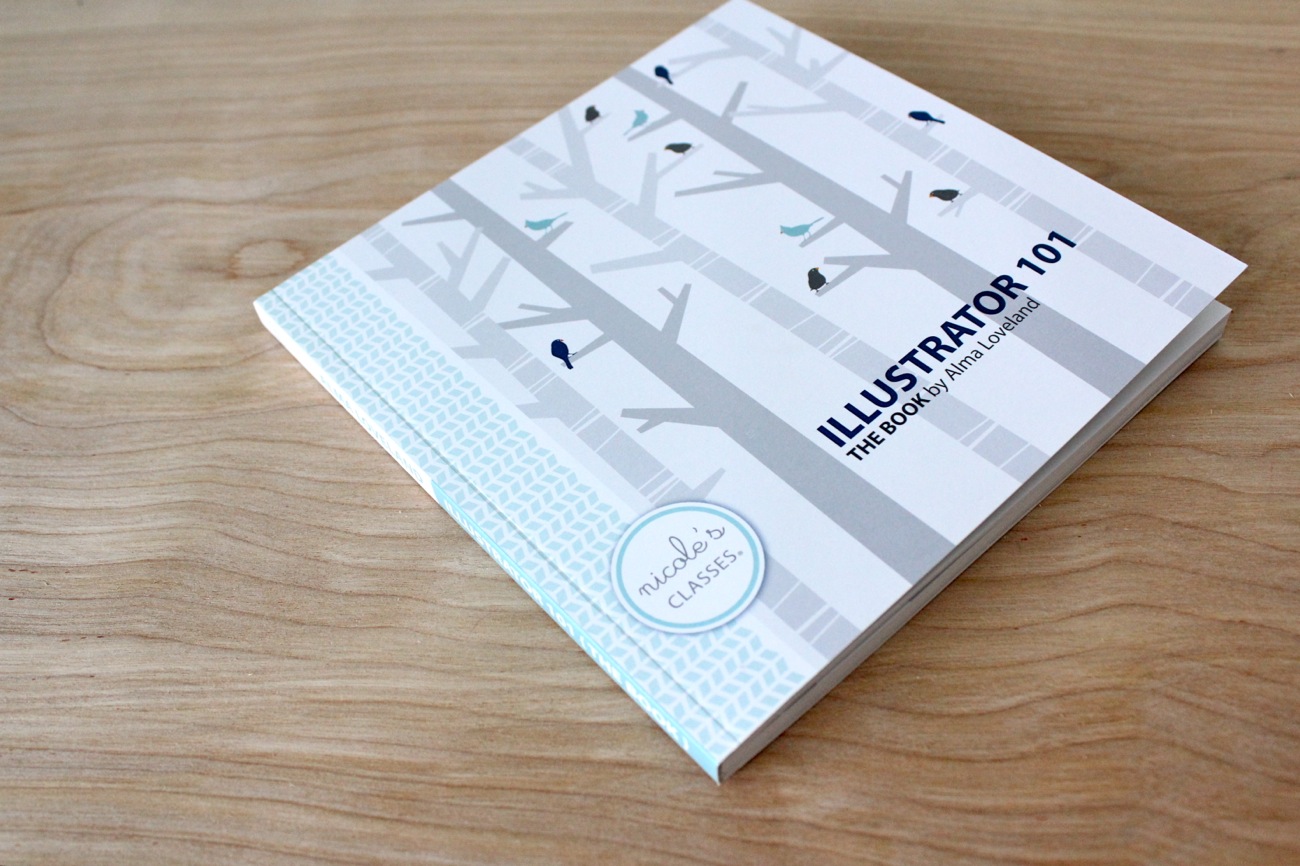
Even after going through all the coursework and re-watching some of the videos again, it’s hard to remember everything. So the book is nice to fall back on.


Of course the best way to learn Illustrator is to practice—which is why the homework is so valuable each week (especially because you get feedback from the instructor)—-and to practice on projects that motivate you. The REAL reason I wanted to learn Illustrator was to improve the look of my PDF patterns. I wanted the lines to be professional. So I couldn’t wait to try out my new skills on the KID Shorts pattern. It turned out better than I had hoped.

Okay.
If you’ve made it to the end of this long post, I owe you a coke.
But maybe you’ll settle on a giveaway instead?
Yes!
Want to try out one of Nicole’s Classes?
• For all MADE readers, we’re offering a 20% discount on any course from now till August 19th.
Enter coupon code: NCANDDANA20
This month’s courses just started today but it’s not too late to join for August. Or you can look ahead and sign up for September as well.
• For one lucky reader, we’re offering a FREE Illustrator 101 Course!
GIVEAWAY RULES:
• Leave a comment, that’s it.
• Only one entry per person.
• Open to anyone!
• ONE winner will be picked via random.org
• Giveaway ends, Saturday 8/10/13 at 10pm (Central Time).
GIVEAWAY IS NOW CLOSED
Winners will be announced next week.
Good luck!
And thank you to Nicole’s Classes for all the creative help and direction. I hope you guys enjoy their courses as much as I have!










I would love to learn how to do those things in Illustrator!
so awesome!
Oh my goodness! I’ve been wanting to learn illustrator for so long. I’d LOVE to win this (and then possibly take the Photoshop and Photography courses as well!) Thanks for telling us about Nicole’s classes, I’d never heard of them before.
That looks like a fun creative outlet-I’d love to try it!
I would love to win this!! I’ve heard about Nicole’s Classes, and would love to try them all!!
Wow! I would love to learn Illustrator! Can’t wait to see more of what you create!
Cool…I would love to learn how to do graphics on the computer
Clara was born on February 9th 2012, no? 😉
Love it! I need to brush up on my Illustrator and I think I’ll pick up the Photoshop as well!
What a great way to learn new skills! I would love to try out one of the classes.
This looks so awesome! I would love the opportunity to learn from one of Nicole’s classes!
I would love to learn how to use. I looks wonderful!
Would love a class with Nicole’s Classes! Fantastic!
I would love to learn illustrator!
I’m learning the basic levels now, I would love to be able to master the things you’re demonstrating!
Ooooh, how exciting! I would be all over this program!
I would LOVE to learn Illustrator. What a valuable tool for both myself and to help my husband in his ministry. (He’s a Children’s Pastor.) What a great giveaway!
Wow, this is what I havebeen looking for! Thanks.
Oh, I would love to learn Illustrator!
Aaack, a course on Illustrator is just what I have been looking for! Would love to figure it out so I can make my own fabric on Spoonflower.
I’d love to learn! I clicked over there and realized I might get myself in trouble if I stayed too long!
This is exactly what i have been looking for! There are countless ways I would use this!
I would LOVE to take one of her courses!
No way! I’ve been looking in to evening classes for working with illustrator, but I don’t know if I’ll have the time. This seems like a perfect solution to my problem! 🙂 Thank you!
You make it look easy to do, but you make everything look easy like your tutorials. 🙂
This is definitely a must to learn as I hand draw my patterns, and would want to someday put them into pdf’s,. thanks for sharing the link to the courses. 🙂
YES PLEASE!! I know InDesign and some of Photoshop, but Illustrator still baffles me. Thanks for the fun giveaway!
This would be awesome! Thanks for the chance to win.
I just started a blog this year and I would love to learn how to make it look as good as yours. Illustrator would be a great step forward for me for sure!
this looks like such a great course and so helpful!
pick me!
I would love to learn how to use illustrator! Thank you!
I´d love to learn Illustrator in order to draw my own sewing patterns there!
I have to learn Illustrator!!!! I’ll never more put an white square to cut drawings on its sides ! 🙂
This is wonderful! Thank you for all your hard work blogging and creating. It’s a treat for your readers :).
Woot! I’ll take a cookie and a free class, please.
Oh wow, this sounds amazing!! I’m a big believer in the “teach a man to fish” adage, so in this case, I’m a super big fan of “teach a girl to design”! Thanks for the opportunity to enter and for offering such a rad giveaway.
I would love to learn Illustrator! I would also love to see another new home update 🙂
I would love to actually learn Illustrator vs. fumble my way through!
I really could learn Illustrator better. I really only know how to use the Live trace function, which can only get you so far.
I’m amazed by what you could do after taking that class! Great work.
Wow, I would love to learn Illustrator, thank you for even the things i learned reading your post today.
this would be awesome!
I love Illustrator…..I’m glad to see you are enjoying it too. Now the world of Vector Magic opens to you 🙂 Enjoy!!!!!
Time for me to learn some new skills!
Learning Illustrator has been on my to-do list for years. I’m glad to hear about your positive experience. This is a online class I can handle!
What a cool opportunity. Thanks!
Thanks for the great post Dana! I was just saying I need to learn Illustrator but was overwhelmed at how to go about it. Super inspired now!!!
How cool! Thanks for the chance to win 🙂
Oh, wow! I would love to be able to learn how to make graphics in Illustrator!!
Way to go for taking the plunge. Thanks for making it seem do-able! Would love to learn myself.
Ooo! Thanks for the chance!
Can’t wait to see what you come up with now Dana! Illustrator is super fun, but I’ve forgotten to do almost everything.
I’ve just begun to scratch the surface of Illusrator and would love to learn more! Thanks for the giveaway!
If I did my life over, I would have studied graphic design. I would love to learn Illustrator.
I would love to learn this!!
Awesomo giveaway! … if I ever learn it, I’ll let you know.
I love making invitations, cards, announcements, etc. but make them all in Word/Publisher. Have really been wanting to learn Illustrator.
My husband does Photoshop, but I a,ways feel so lost when he tries to explain stuff. I’d love to try a class and actually learn one of these programs.
I was looking last week for a course or a good book to learn me illustrator… This is exactly what I need!
Oh! I own my own business and create a lot of things in Photoshop, but it’s come to my attention Illustrator would be far more beneficial! I would love to win the 101 course. 🙂 Love your blog!
Would love love love to win this course!
I would love to learn how to use Illustrator!
Illustrator has long baffled me. I’d love to actually learn it!
I’m not sure if my brain can learn anything more, it seems to misfire a lot lately, but I’d love to try! Thanks for posting about this, never would have known anything like Illustrator classes existed!
Wow, would love to learn how to do this!
How neat!! =)
Yeah! I definetely have to do a Ilustrator course! Thanks a lot!
Good job! I always wanted to learn Illustrator!
I would love to win!!!!
This looks great! I’m gonna give it a go, definitely.
This sounds great! I’d love to do the illustrator course, I think it would be so useful!
I would love to learn Illustrator. I’m used to muddling my way through with Paint.NET, but Illustrator looks like a much more versatile tool!
This is great! I’ve been wanting to learn how to use Illustrator. Thanks!
Crossing my fingers!!! This is awesome!
I have Illustrator and don’t know where to begin. This would be great! Thanks!
Ooooo!!! I’ve been putting off learning Illustrator too but you’ve got me convinced! Thank you!!
I would love to learn illustrator! I’m off to fiddle around on the computer!
I would love to learn illustrator.
Ooh, pick me, pick me! I would so love to win this class! Thank you for the giveaway!
OMG, would love to learn this!!
awesome!
i use a mac program called pages (similar to microsoft word) to make all of my graphics. illustrator would be a godsend!
I would love to learn illustrator. Love what you,ve created.
I would LOVE to learn this too!!!
I still use Paint… so maybe it is time for an upgrade 🙂
Wow……I would jump at the opportunity to learn Illustrator, and this is a great time in my life to learn it…..switching careers!
Sweet-oh what I could create!
I’ve had Illustrator for almost 3 yrs and have been wanting to learn it!! It can help me digitize designs for my embroidery an I really want to create my own logo for my business instead of using my photoshop watermark on my vistaprint business card background! LOL Thanks for this giveaway!!
I love the things you created. I have a Illustrator on my computer, but I find it kind of overwhelming so I haven’t really used it. A course would be just the thing to get me going!
What a great opportunity to learn something new!
you’re website is always so lovely and inspiring! Thanks for a fabulous giveaway!
What a great giveaway. I can’t wait to go look at the classes they offer!
Hi Dana! Thanks to you and Nicole for the chance to win! I’d love to learn how to use Illustrator! Blessings from Bama!
Ooooh! I would love Illustrator and to take this course! It sounds amazingly helpful.
This sounds like a really neat thing to win!!
I would love to win this! I only know the basics and end up doing things in Photoshop that I should be doing in Illustrator!
I love the courses offered! Thank you so much for posting about this! Hope I win 😉
I don’t have Illustrator or Photoshop…need to get on that. It looks awesome.
How awesome! Have wanted to learn illustrator for an age :-). Thanks for the opportunity :-). Oh, have posted my result of the Kid Shorts pattern on my blog. Love the pattern and I love seeing how you used illustrator to assist in the pattern development, it really is a very smart way to print this pattern.
I took some graphic design courses years and years ago before I had kids. So much has changes since then. I would love to take this class!!
Wow, you are doing amazing! I am crazy impressed with your bathroom mockup, sheesh!
I’ve learned some of Illustrator but my teacher wasn’t as helpful or into the style of design I wanted to learn. Love Alma’s design work and would love to take her class. thanks for the chance!
Wow! I would love to learn how to do that!
Wow! I’d love to take this class. Thanks!
i love nicole’s classes! I have the photoshop book and i love it!
WOW that sounds like an awesome course. Thanks for the opportunity to win!
fantastic giveaway! pick me 😉
Would love to take the class! Looks like lots to learn and fun!
Cool! Thanks for sharing and the chance to win!
I love to lezarn new things and this would be perfect to change my picture. So i would like to give it a go, so i’m in.
This is brilliant. I downloaded a trial version of Illustrator and never opened it because I was too intimidated. These courses sound very manageable and beneficial!
What a wonderful opportunity! Thank you Dana and Nicole!
Ooh this would be amazing to learn 🙂
I’m definitely interested!
Wouldn’t the year on the “Claradise” graphic be 2012, when she was born? 😉 Or maybe when she turned one, so 2013 would be right…
Very cute either way!
I have been wanting to take one of her classes!
I’ve been struggling with Illustrator for 3 years! Trying to teach myself is just not working. I’d love to take a class
I could totally use this!
great!!! Thank you so much.
So fun!
I would love to learn to use Illustrator. Thanks for the chance to win!
thanks for the inspiration and chance to learn something new.
pick me 🙂
Wow this would be fun… my brother’s the multi-media guy in the family, but I would love to do a little myself too! 🙂
Thanks Dana!
Oooo, I would love to brush up on my Photoshop skills… pick me! Thanks for hosting this- so fun!
I would love to learn to use Illustrator!
This is such a cool giveaway! I have always wanted to learn Illustrator, but found it so intimidating. Nicole’s course seems to make very approachable!
what a great give away!
How exciting! I’d love some step by step instructions- so many possibilities!
I hope I win. I love Nicole’s classes. 😀
I really want to learn illustrator and this sounds like the perfect way to do it. Thanks for the chance at a giveaway!
I love the Anchorman posters! This would be a great opportunity!
Looks so cool! Would love to win.
My husband just got a job teaching second grade. I’d love to help design stuff for his class 🙂
What a great giveaway!
awesome!
Wow, I’d love to learn Illustrator!
I hope I win, I’ve always wanted to learn illustrator…
Thanks for the chance …
Thanks for the giveaway! I would love to learn illustrator!
I just said to a friend yesterday that I want to take this class! I would love to win!
I have illustrator but haven’t learned how to use it yet, this would be a great course!
I have been scared to try to learn Illustrator, but you’ve inspired me!
YAY! What an awesome and useful giveaway! Thank you.
Just beginning with all this craftiness and would love to learn illustrator to help me along!
Oh my. Just checked it out and SO many great classes to choose from! Pick me random number generator. Pick me!!
I have been a fan of Nicole’s Classes for a LONG time…but life is busy with a new baby, so I’ve been waiting until the newest is a little older before I took the Illustrator class. Well…the little one will be ONE in less than two weeks, so I think now would be a great time to dive in. Thanks for the chance to win!
AWESOME! I know PS CS6 but Illustrator is totally foreign to me. Would LOVE to learn it!!!
wow this would be so super awesome to win!
So cool! I learned Illustrator in college, but I don’t feel like we learned any of that. (or maybe I just forgot it all!) A refresher course would be awesome!
I don’t know if I could learn something of Illustrator in english, but I’d like it!
Surely I must sing Claradise! 😉
Thanks for this giveaway!
Awesome giveaway!! Thanks for the chance to win, I would love to learn this stuff too!
This would be fun to win!
Wow! Sounds like a great course!
Oh, this is just what I need for work! I’ve been putting off learning Illustrator for a couple of years now, and this is the push I’ve been waiting for…
I have a 27in iMac and don’t have illustrator….is that wrong? 😉
Wow, what an awesome giveaway! I hope to be the lucky winner!!!
I would love the opportunity to create anything and everything. Thanks for the chance to win!!
I love learning new programs and would love to learn more about vector images.
Count me in!! I’ve been playing around, but instruction would be ever so helpful!!
Oh! I so need to learn Illustrator! Reaaaally hope I can win this.
I have always wanted to learn illustrator
Wait…. was Clara born in 2012 or 2013?
I’ve been wanting to learn Illustrator so I can make my drawings/embroidery patterns look nice! Oh, I hope I win! 🙂 Thanks for the giveaway!!
NEED this class! Thanks for the giveaway!
I like Photoshop but I want to learn Illustrator to make paper piecing patterns!
oOooh, this would be fun! I could use some new awesome skills. Thanks!
So funny I’m just working on Illustrator at the moment to create personalized vacation postcards for the kids….. but it looks like I have still a lot to learn…..
Thanks for the post and the giveaway !
PS: love the colors of the bathroom 😉
Nice work! I love how you used what you learned to do the mock up of your bathroom. Such a great idea!
Awesome giveaway 🙂 Thanks for the chance to win.
Awesome giveaway! Learning how to use Illustrator has been on my to-do list for a loooong time.;)
Yes please!! Would love to learn Illustrator!!
WOW! I can’t wait to check out their classes! I had never heard of them before. Thanks!
Please x Please x Please!!!!
Oh my! I have always wanted to learn Illustrator. I am totally excited!
I would love to learn!
Looks amazing! Definitely need to expand my illustrator skills!
Did you read my mind?? I would love to take an Illustrator class!
Love this! I’ve been wanting to learn more about those programs but was clueless on where to start. Nicole’s classes look like the perfect fit! Thanks for introducing me to this.
I would love to learn photoshop!
I love this site!! Thank you for all your awesome ideas and tutorials!
I would LOVE to take this class!
Hi from Argentina! Did you finally try the Milanesas? kisses!
I’d love to learn more in Illustrator! If I don’t win I will check it out anyway! 🙂
I’d love to take the Illustrator class! I took an intro class once, but once class was over, it was so difficult for me to remember every important detail. I love the idea of downloading the lessons and having the option of looking back- would make it so much easier to really master the material!
Oh, it would be so helpful to take the beginner illustrator 101 class. I hope I’m the winner!
Oh this would be great. My graphics are for rot when I try to crack some things out.
Would be so great to get some more concrete skills. I often feel like I’m feeling around a dark, dark room in illustrator.
Oh my gosh I need this!! I have illustrator but have no idea how to properly use it. Help! -Jen
Hi Dana, thanks for all of your tuttoriols and your beautiful website!
I would love to win so i can make everything nicer and better.
Grtz Priscilla from the Netherlands
What a great looking class! I would love to win a chance to learn! Thanks!!
Yes, please!
cong. to u !
Yahoo!!! I would love this! Thanks Dana 🙂
This would be amazing to win this Illustrator 101 Class! I have tried to learn photoshop and it clearly is challenging to go to a class and then come home and try to replicate what we did in class… even though I took copious amounts of notes, it just doesn’t make sense! Having the ability to download and work at home on my own computer with access to purchasing a book to refer to is brilliant! Fingers crossed for this one!! Thanks so much!!
Please pick me. I would love this so much!
Wow! That would be so much fun to learn!
OMG, I very much wanted to learn something like this. Just from this post I learnt that there’s a class available. Wish I could win this!
OMG! Would love to win!
Would love to learn illustrator!! I could make some cool tattoos for my little blondie. 🙂
thank you!
I’ve taken the tabletop photography class, but would LOVE to take the Illustrator one.
I love it all…I think your family would LOVE a Claradise card in the mail! Who wouldn’t! I would love this as I’ve put most things creative on the back burner with three kiddos at home. But I see how much you accomplish and it motivates me to try! Thanks again Dana
It would be fun learn Illustrator!
Awesome!
This might be the most exciting giveaway you’ve ever had! I would be over the moon if I won!!!!
Pick me! Pick me! 🙂
This is a great write-up. I have been meaning to look into illustrator to help me with my designs.
I’m delighted to learn about Nicole’s Classes and the chance to win a class. Thank you!
Looks like an extremely useful tool!! Have to try regardless of the giveaway.
BTW – What’s with the cascarones? (confetti filled eggs)
I would love this opportunity to learn Illustrator! Thanks for hosting an awesome giveaway!
I would love to take the Illustrator course!!
I would love to learn this! My husband would also love to learn illustrator. He is much more creative than I am when it comes to these things! I hope I win!
clbiehl @ gmail.com
I would love this Illustrator course! I am a Corel girl, but I know Illustrator is just superior. I’d love to learn to use it!
What a great giveaway! I would love to learn Illustrator.Thank you!!
Would love to learn Illustrator! Great giveaway!
I’d love to win! My husband has a small ministry and somehow I fell into the role of graphic designer–a job that I really have no background in. By slugging through the help menu and googling questions I’ve learned to work some with photoshop, but an entire class on illustrator would be a wonderful help. I’d take the whole series I think!
Would love to learn Illustrator.
Fantastic! I have been wanting learn Illustrator for so long and had not heard of Nicole’s classes. Thanks for the chance!
I need this! I’ve been teaching myself by way of tutorials, but I’m sure there’s a lot left to learn that I didn’t even know I needed to know!
I do need to learn Illustrator…
These look fantastic! Thanks for a chance to win a class! I’ve been wanting to learn Photoshop for quite a while.
Great information. I definately need to check out the class schedule. Thank you for sharing.
WOW – talk about another fun obsession to learn in this lifetime!!!!
Thanks for the chance.
This is awesome!
I’ve been wanting to learn Illustrator to impress my husband!
I’ve wanted to take one of her classes! A free class would be superb!
Ooh!! I would LOVE to learn how to use Illustrator!!
I would LOVE to take any of her classes! They look like a lot of fun! It would get me away from trying to teach myself with tutorials.
Oh! How I’d love to take a class with Nicole! awesome !
I’d love to win — thanks!
I would love to have this book!!! 🙂
I would love to learn how to use Illustrator! For my own projects and to use in my art classroom at school! 🙂
I love Nicole’s Classes, and Alma is a fantastic teacher. I would love to win a chance to take another class (I’ve already taken Illustrator101, InDesign101, and Pattern Making)! Thanks for this giveaway!
What a great give-away! I’d sure love to learn Illustrator. Thank you, Dana 😉
I am so glad to learn about this class!! I am a designer wanna-be, so this could help a lot!
I have tried to learn Illustrator on my own, and it just isn’t working. I would LOVE to take a class!!
It would be really nice to learn illustrator.
I’ve been wanting to learn Illustrator for ages! How awesome and thanks for letting us know about Nicole’s Classes!
I feel Illustrator and I would be happy friends! I’d love to get more acquainted with the program and this class sounds like just the thing!
I’d love to learn all about illustrator!!! It’d be so nifty! 😀
This is so cool! I would love to learn
I have been looking for a class like this, but didn’t even know where to start. Thank you, Dana, for the post, and thank to Nicole’s classes for the giveaway.
Amazing!!! You have done a great job and I want to learn too!!!
I would love to win this course!
Illustrator 101 sounds fabulous!! I would love to learn!!
I use illustrator everyday for my small business and I would love to see what I’m missing!
I have wanted to learn Illustrator for a long time!! Pick me!! 🙂
Yessss!!! Thank you! I can’t wait to read my “new Illustrator 101 Book” (hint, hint) 😉 hehe
I’ve spend hours messing around with Illustrator. I would LOVE to actually know what I am doing so that I can be more efficient with my time!
You have the best giveaways Dana! I don’t know anything about Illustrator and have been meaning to give it a go for ages now. This would be a great opportunity!
I think I could get lost in Illustrator! Looks so much fun! Thanks for the opportunity!
I would love the opportunity to take the course you’ve described! It sounds like the kind of training I need to better my graphic design skills! I’ll keep my fingers crossed that I’m chosen!
Thank you!!
Fun!!!! I would love to learn more about it!
Amazing! I would just love to take a class like this.
I received Illustrator as a gift over a year ago and haven’t been able to get started – this would be such a treat!
There is so many things Illistrator can do. I would love to learn!
So great, I would love to learn Illustrator! Great giveaway!!
This sounds perfect, count me in for this super give-away!
What a great give-away! And I love your practical use of illistrator for tile planning – great idea.
I was JUST telling my husband that I want to learn illustrator!
I have always wanted to learn how to use illustrator. This is great inspiration!
Would LOVE to make my own Xmas cards etc with my own photos & cute graphics!!
I would love to take this class! thanks for the chance!
Wow how cool is that!
I’ve got a head full of ideas on how to use illustrator, but no idea how to do it
This would turn my world upside down! I’ve had illustrator for years and I am still trying to teach myself it… It’s not really working…
Ooo yay! That class looks great! Thank you for the chance to win.
I’d love to take this course! Thanks for the giveaway, Dana.
This would be the perfect motivation to finally learn!
Woo! I’m good with photoshop, but I would love to learn Illustrator as well. I own it but I haven’t been able to get a good start on it.
Oh wow, I would love to win this! The course looks awesome.
I learned how to use Photoshop like 11 years ago and haven’t used it since, but I’ve recently wanted to learn to Illustrator! Thanks for the opportunity!
H I would so love to take the class!
OK (big breath) I’m ready for this course too!
I don’t know a vector image from a riff or a tiff or a taff.
Sounds perfect, thanks for the great review!
So many fun classes! Wow!
Yes please!
Yes please, count me in!
I’m in! 🙂
Great post, thank you very much. I hope that my English is good enough to participate in a course 🙂
Isabella
I would love to win!
How cool! I have such a hard time learning these types of things from a book. These classes look great!
Love to learn!
oooh! Pick me! I have been wanting to learn Illustrator. This sounds so awesome…
WOOOHOOO for giveaways!!!
I would love to learn Illustrator!
Great Giveaway! Would love to learn!
I’ve just started looking into Illustrator. A class would be great!
looks like fun!
I’d love to learn Illustrator! Thanks for the chance!
I love the Anchorman posters!
I would love to learn. Thanks for the giveaway.
So cool! I would love to win and learn from this class- amazing!! 🙂
I love it:):):) look stunning:)
Oh I would love to take the class! Awesome thanks Dana x
Possibilities, endless!!!! Awesome giveaway….
I love the Claradise announcement! Great use of Illustrator!
I’ve been dying to take one of Nicole’s classes – especially the Lightroom 101 class to give my photos the love they deserve!
Thanks!
I’d LOVE to learn Illustrator!!
I’ve never heard of these classes but they sound great. My husband just started screen printing at home and this would help us greatly. I can’t wait to tell him.
I would be over-the-moon-and-back-again honored to be so~thrilled to win this class! love and xox, Mary Ann
This is just what I need! I am always coming up with poster, invitation or other ideas and then asking my husband to create it for me in Illustrator…I would love to be able to do it myself!
I would LOVE to learn. I’m always putting something together and using word as well. Thanks!
I am looking to create enticing art to grab the audiences’ attention. Illustrator looks like a great tool to do this.
That looks great! I love a class that is visually pleasing as well as informative.
I dabble in a little Gimp that my sister down load fr me for free, but I would love!! to learn illustrator!!
Would love to learn!
What an awesome giveaway! So many practical applications too as I look towards starting my own business. Thanks for the chance to win!!
some of these classes look amazing! would love to have the chance to try one 🙂
I’ve been wanting to learn!
Just waaaaaooooou !!! Thanks for the link !!! and if I win, I will be so happy !!!
I’ve always tried to use Illustrator, but get stuck, and so straight back to photoshop!
I am thrilled to read about your new skills. And would love to win your giveaway. Nice looking pattern. Pat.
Oh yes please, the wonderful things I could create for the children’s rooms!
I would LOVE to learn more about illustrator. I have to use it at work occasionally, and I am horrible at it!
This looks like so much fun–the possibilities are endless!
I would LOVE to win! I have long wanted to attack Illustrator.
Fingers crossed!
I’d love the chance to learn how to do something arty on the computer! Thanks for the winning chance.
I’d love to learn!
Such a great idea to use illustrator for pattern making. I bought a pattern-making program but illustrator would have been useful for sooooo many more things! Wish I’d thought of that… Great mockups and i will definitely check out the classes – I’ve done everything that interests me on craftsy so this recommendation is coming at a great time.
I would love this! I’m self taught and don’t understand a lot of what is there.
I would LOVE to learn Illustrator! Looks awesome 🙂
I have always wanted to learn Illustrator, thanks for the chance!
Oh how I could use this help!!!! If you have managed to do what you do in Word, Dana, then you are A-MA-ZING!!! (With EXTRA ZING!!!) 🙂 I’d love to win!
Illustrator has always daunted me! I would LOVE to learn it!
This is looks like fun!
OMG, I would LOVEEEEEEE to win this. I have been looking and searching for something, someone to teach me. I have tried over and over to learn and find it so intimidating. Thank you for the CHANCE!
Would love to learn Illustrator!
Definitely would be happy to win. If not, hoping my boss will spring for this training! Thanks for the comprehensive feedback, I always like to know what I’m getting into!
So cool! I would love to learn Illustrator! Thank you so much for the chance to win!
This would be such a great class to take.
Awesome! Thanks for the coupon codes, and may I just say that the Claradise card is absolutely adorable 🙂
Ledys
I’ve learned how to use Illustrator for my graphic design course and I LOVE it. If you want another resource to add to what you have from your class the Adobe Classroom in a Book series are great for learning how to use the Adobe design suite as well. You will only love it more as you use it more. 🙂
Illustrator is something I have long wanted to learn! I’d love the chance to take the course. Good on you for trying something new!
would love to win/take this class so I can understand my Graphic Designer husband 🙂
Awesome designs! Would love to learn as well.
What an amazing program. Would love to try it out.
Would love to learn Illustrator! Thanks for the chance to win!
This would be so lovely! I just started blogging about a month ago and I definitely have a lot to learn. Thanks so much for the chance!
Pick me please!
This would be so fantastic to take advantage of! Hopefully my number is picked 🙂
I’d love to learn more!
Thanks for another chance to win a great giveaway! I could definitely use that illustrator course for work and for play!
Me! I would love one! Thanks for offering it up!
Illustrator scares me to pieces. I tried the free 30-day trial and got no where fast. I could tell lessons were necessary. These lessons look so awesome! I would love to make graphics for printing or learn how to make professional sewing patterns. That would be so fun. I could see myself Loving Illustrator!
Eek! I’m a self-taught Illustrator newbie and have been dying for a class, but it just isn’t quite in the budget these days. Thanks so much for the chance!
Great site- I would LOVE to learn another application! So much that can be created..awesome!
Oh how fun it would be to “know” what I was doing in Illustrator. I currently use the hunt and peck method. Thank you Dana for sharing all of your fun adventures in learning!
I desperately need this class! Thanks for the opportunity and that coupon!
Ooh, that would be completely awesome. I open Illustrator up on my computer, gawp at it for a bit and then shut it down again. Ridiculous, I know.
Amazing! Would love to win!
I would put my spectacles on and be a good little student for this class!!
I would love to learn Illustrator. My husband got it gor me but I have no idea how to use it yet.
You are one brave woman! I break in hives when I think about Photoshop or Illustrator. I’d love, love, love to know it!
can’t wait to see your house finished. I like the mock bathroom you did!
Oh my gosh I need this class so bad! Hoping I win!
Okay Dana – this is for me! Exactly what I’ve been needing! I’m gonna hop over to Nicole’s site and see what else she offers. Thanks for this post and for the giveaway! ~ Dori ~
I would love to learn illustrator! Thanks for the giveaway.
I’ve been eyeing this course for a while, I’d love to win it!!!
Holy cow…total AWESOMENESS! Thank you!
Great deal! Been meaning to learn this for a while.
This looks fabulous!
Yes a course would definately motivate me to learn illustrator!
I’d love to win!
So cool, would live to learn this. As a stay at home mom I miss going to work and school and all I the classes and in services where I get to learn lots.
Would love to win – thanks for this great giveaway!
This is an awesome gift to one very lucky person and I hope that’s me! I’ve wanted to learn this for so long!
What an amazing opportunity! Thank you.
Yay this would be so awesome!
Thank you for the class info! It’s so great to be directed to these awesome resources!
I want this SO BAD! 🙂
thanks for the opportunity to win. 🙂
I would love to learn Illustrator, or even take the Lightroom class. What a great opportunity! Thanks so much!
I’d love to learn Illustrator! Thanks so much for the opportunity to win.
Yay! So glad you got to play in Illustrator! I love it and have been learning it this year as well! I’d love to take a whole course though so I’m crossing my fingers for a win!
I really want to learn how to use the program so I can start drafting my own patterns…fingers crossed!
Congrats on your new home and this course looks like it ROCKS!
Great post, Dana! I’ve always wanted to learn Illustrator. Fingers crossed! 🙂
Oh! I really need this! thanks for the chance.
Very nice 🙂
I love illustrator! I have drawn a few patterns with it, but I need to learn more. Thanks!
This sounds like just what I need as I too make all my graphic stuff in Word…shhh! Thx for telling us so much about the course. Will definitely check it out even if I don’t win.
I’m good with indesign and have been wanting to learn Illustrator for EVER…
Very cool! This would be super-awesome to win because I would give it to my super-awesome sister, who is working on her graphic design certificate. She’s pretty familiar with photoshop, but I don’t think she does illustrator…
You had me at “Microsoft word” I feel better now 🙂
Anytime you learn something new…it’s a good thing! You go!
Fancy! I’d love to learn.
I’ve always wanted to learn illustrator. Thanks for the opportunity.
I wish I can win!!!! New sewing projects, new house decoration projects.
Dude, I totally want to win this!
-liZ
I already know how to do a few things on illustrator but I’d love to take a an actual course and get an overview of all the main features. Crossing my fingers!
I got Illustrator several months ago and still haven’t finished my tutorial for it. I squeak by. I’d love to win this!
I would LOVE to learn Illustrator!
This sounds awesome! Thanks for the giveaway, I hope I win!
Wow, so neat. I would love to learn how to do this.
Wow, I don’t know anything about Illustrator. Definitely 101 for me!
Would be life changing to win for sure!
Comment! Illustrator! Learnin! eeps!
I would love to learn Illustrator. I’ve been too intimated to even try it.
I’d love to do this course. Thanks for the chance to win!
I already use and love Illustrator, but I think a class like this would be a perfect way to learn what I don’t even know to ask. 🙂
Ja volim Vas blog i prijavljena sam na newsletter.Odusevljava me lepota vasih fotografija i postova.ja sam nov blogger,zena od 53 godine ali volim da ucim od boljih.Odusevio me Vas pokon u vidu kursa.Meni bi mnogo znacio jer sam potpuno samouka i napredujem po malo svakog dana.Ipak sam zadovoljna svojim blogom i interesovanjem za njega.Nemam cak ni foto aparat ni dobar telefon ali imam zelju i volju i nadam se da cu dostici Vas nivo znanja.Imam cerku koja studira Arhitekturu i sva sredstva su ka njoj usmerena.Za mene ce biti vremena kada ona zavrsi fakultet.Ukoliko bi mene izabrali za kurs bila bih neizmerno srecna.Hvala Vam ,Ja imam unike pa sam se zato i prijavila na Vas blog.Zelim Vam mnogo uspeha i zdravlja Vama i vasoj porodici.Pozdrav:)))
I’ve always wanted to learn how to properly use Illustrator. Pick me! 😉
I’m self-taught on Illustrator, but I could really use some proffesionel help. I would definitely buy the book, it looks like a great help.
Love from the Netherlands.
A class sounds like a great place for me to start!
oh my! i would love to do this course! i need to work with corel draw and illustrator to create graphics for my science publications, but I’m all self-learned and am sure that there is so much I’m missing… wishing myself luck 😉
Yes please!
I’ve never never won anything but you never know maybe this will be my lucky time.
I would LOVE to win this course!
I have this software and have never used it. The course looks great! Thanks!
wow! this course sounds awsome!
This is on my bucket list :).
This would be great for making christmas and birthday cards and invitations! I think this class would be great! I’d also love to have my kids learn too.
this sounds great! Thank you for the chance!
Oooh! Illustrator scares me but I would LOVE to learn how to use it. Oh the possibilities….
I would love to learn Illustrator! Thank you for the opportunity!
This is just what I have been looking for!!!! 🙂
So great, Dana! I have been wanting to get/learn Illustrator to make things for my new classroom and for new lessons. I’m seeing them every where in teacher blog world and am amazed. Would love the free class…but will definitely buy the book, look into the classes in the future if I don’t win. You guys have a great last few weeks of summer, will miss seeing you at Ford!
(Love that bathroom mock up.) I use Illustrator to create patterns. It’s amazing how versatile the software is. I’d love to learn how to make pretty graphics.
What an awesome opportunity!! The class sounds fantastic!! 🙂 Thanks for the great information!!
Impressive sounding course. It would help me because I really have no artistic talent to speak of – but I DO do software!
What a great giveaway! This course looks like it has some awesome information!
Would love this!
Love, love, love Alma Loveland!!! Would (also) love a chance to take a class and learn from her!
this is wonderful. thank you!
Kathryn
Wow it looks so AWESOME and so much more superior to word which I still use too. Cool giveaway.
I would love to learn to use Illustrator!
what fun to be had with illustrator
Would love love LOVE to learn how to use Illustrator!! 🙂
Wow! Nicole’s classes look awesome….thanks for the opportunity to win this Dana.
Sandwiches!
I would LOVE to learn illustrator!!!
I would love to win this! I took the worst Illustrator class in college and still cannot use the program.
Wow…what a fantastic giveaway!
I would love to win this! I have been trying to design fabrics for Spoonflower and it’s so hard if you don’t know what you’re doing!
I feel like I could really use some new skills. I have been out of the loop taking care of babies for the last several years. Time to learn something new and get back out there.
Just when I was wondering how I would show the Grand how various fabric colors would look in a specific pattern, along comes this post to solve my problem, and, will be a great skill for the blog.
Thanx for the info!
This is awesome! I am a self-taught Illustrator user and could definitely use some tips.
Wow, I’ve been wanting to learn Illustrator and some other programs she offers forever and never knew how I was going to make it happen until now!! Thanks for introducing us to Nicole’s Classes and thanks for the giveaway!
So cool! Need to add Illustrator to my list of things to learn!
Sweet! I love Illustrator!
This is great!
Fingers crossed!!
I would LOVE to learn Illustrator!
me, me, me!!!
I would be so, so honored to win this course!
I hope I win!!!
I would love to learn this!!! I have zero graphic design experience and it would be amazing to start here.
i have illustrator and am in desperate need of some help!!!! thanks for this awesome giveaway!!!
I would love to get back to Illustrator basics (have been using it for years) but it’s been a while since I learned something new on it! Hoping to win so I can have something ‘graphic-ey’ to look forward to!
PS. I love that Claradise!
Ooh, this looks great!
I would love to learn illustrator! how awesome
You are awesome, this is what I was looking for. Thanks so much Dana. You rock!!!
Would love to brush up on my Illustrator skills!
Will I dare try ?!
ahhh, how fabulous! Thanks, Dana!
I would love this! Thanks for the wonderful giveaway!
Oh, what a great giveaway! I’d love to win this. I haven’t used Illustrator in years and it would be great to have a refresher on it!
I would love this!
Cool! I’d love to learn too!
Illustrator has been on my list of things to learn for SO long. Would love to win and have/get a reason to do so!
Ohhh! This looks amazing, would definitely love to win!! Thanks for the awesome giveaway!
i just got illustrator and have NO IDEA how to use it, but would love to get started and learn. thanks for the great giveaway, my fingers are crossed!!!
I would love to lean how to use Illustrator. Thanks
pick me!!!
I really really need this! I have been wanting to learn illustrator for sooo long!!
This book looks awesome. I would love it!
Love the book and would love to win!!!!!
oh my,
I would LOVE to win!
My hubby works as a software engineer for that totally unknown company ADOBE, but every time he tries (correct: I force him) to show me how to use this program, or photoshop, we are about to schedule an appointment with a marriage counselor after like 2.5 minutes….
Save my marriage!
I would love to take the Illustrator 101 class!
How exciting, I would love to learn a new program. Thanks for the giveaway!
Would be amazing to win – thanks for the chance!
I’ve always wanted to learn Illustrator! I got Adobe Suite a while back on sale, and haven’t had the time to learn it yet. Here’s my chance!
I’ve been wanting to lean Illustrator for ages! This would be ideal!
*learn*
I would love to win this. Thank you for the opportunity
I’m itching to get to grips with illustrator. As a complete beginner this would be the perfect place to start.
Fingers crossed I win.
I’ve been trying to learn illustrator on my own, but haven’t made much progress… Thanks for the great giveaway!!
I could never learn on my own!
I’ve always wanted to learn Illustrator- so keeping my fingers crossed on this one! 🙂
AWESOME post, you’ve totally inspired me to take the course. Just need to add it to the long list of projects 🙂
Oh this is awesome! I’m in!
Wonderful giveaway! I’ve been threatening to learn Illustrator. . .but it’s one of those things I feel I should already know but don’t. I have to check out this class. Thank you, Dana!
Would love to learn! Thanks for the chance.
I would love to learn illustrator!
I would LOVE to learn illustrator!!
I taught myself photoshop CS5 and having someone teach me illustrator would make life so much easier! Awesome giveaway!
I would love to win this!! I would LOVE to learn Illustrator and Photoshop! Thank you!!
To be able to translate what’s inside my head onto a computer screen via Illustrator would be a dream come true!!!
This is so cool! I would love to learn illustrator! Or photoshop! Great giveaway!
I love the announcements even if there late!
What a great giveaway! I’ve never heard of these classes before but I would love to try them!
Oh I would love to learn Illustrator!
I love the shower mock up. It seems like illustrator is making interior home design choices easier.
My illustrator could really use some brushing up!
Great giveaway! I’ve been nervously circling Illustrator for a few months now…
WOW, what a cool program! I would love to learn this and share my creations!
That course sounds wonderful! I have been playing around in Word for far too long!! Thanks, Dana!
i would really like to learn Illustrator, it would help me make Christmas cards and so much more!!!!
I need this 🙂
Ha! I’m pretty sure you and I were taking Illustrator 101 at the same time. I made my typography poster as a Father’s Day present too. Alma is a great teacher and Nicole’s classes are pretty amazing.
This would be awesome! Thanks for the giveaway!
I could use some skills…. seriously. skills needed.
I love Illustrator and would love to take one of their amazing classes.
I took the basic DSLR class and it was great! I would looooove to take the baby & kids class now.
I haven’t heard of Illustrator but the crafting bug has bitten me…HARD and I’m excited to know more about it. I’d like to learn more about digital photography as now I’m a little more than rusty….another expensive hobby as my husband would say.
I want to take this course@!
I would love to win this. I used Illustrator years ago and enjoyed the creative options it gave me. But I have not had anything like it for years and have wished I did.
Thank you for the chance to win.
Michelle
Thank you sooo much for this awesome giveaway! I would love to take a class!!
Thank you Dana for all your amazing information! Every time I read your blog I learn so much!
Yes, I need help!!!
I’d love to take this course!!
This looks like so much fun!!
I would LOVE to learn Illustrator! And will probably check out some of her other courses as well, they all look great.
I would love to win! I have only Microsoft word as well!
Tomorrow is my birthday so… PICK ME!!
I would love to take a class!
I’m totally amateur, but I design all of our church’s postcards, posters, flyers, etc. This would be so helpful!
I would love the chance to take this class 🙂
Oh my I am so intimidated by Illustrator but want to learn so bad! crossing fingers!
This program is really awesome…
I have never heard of Illustrator, but I now want to. I love making things and I’m really good at it, so making my own icons and images is right up my alley.
This would be a wonderful birthday gift – oh pick me!!!
Oh, I need sooo much help with Illustrator. Thanks for the tip 🙂
Oh your post makes me want to go take her class right now! I’d love to win.
I need this!
Neato!
I want!!
Even if I don’t win, I am going to do this course. Been meaning to brush up on my terrible computer skills for a whie now. Looks like a great course.
No way! Alma is awesome! I took a mini class from her a couple of years ago and learned just enough to learn that I don’t know anything about illustrator. Thanks for the chance to improve me skills.
I would love to learn how to use the pen tool more! This course looks great.
I painfully muddles my way through Photoshop, how I wish I had done something like this! I guess it’s not too late! Thanks for the giveaway!
Wow i really intrested in how to learning illustrator, and your blog post about this classes is actually such an interesting program to join in. Thank you for ur give away events i hope i will be the lucky one to win it 🙂
Much love from Indonesia,
Jennifer
I have ALWAYS wanted to learn Illustrator and have toyed with buying it but never made the leap. I have a home website design business and use PS Elements to modify my images for the web and create logos. But using Illustrator would really be a nice tool in my arsenal.
I am ver interested.
I would LOVE to learn Illustrator! Thanks for the chance to win!
This would be FAB!
Awesome!
What a lovely giveaway! I’ve been intrigued by photoshop and illustrator, both, for the past couple of years…
Great giveaway and thanks for the patterns and tutorials – they are great and perfect for my 3yo!
I’d love to learn! Thanks for the detailed description of the course!
Oh yes, please!!! I have PSI and no idea how to use it! Pick me! Pick me! LOL:)
oh man. this definitely looks like a class i need to take.
I’d love to take Illustrator 101 because it would be great to get feedback when doing the homework, especially from someone like Alma whom I’ve read so many wonderful things about.
I would love love LOVE the opportunity to win this! How cool! Thanks for the giveaway!!
I definitely need this class! Illustrator and I are frenemies, at best.
Looks fun!
Would love to learn Illustrator.
Would love to learn this program!
I would love to learn this program too!
The classes sound great! I’d love to take one of her classes and the Illustrator course would be a great refresher! Thanks!!!
Cool!!Thanks for the giveaway!!
I’ve always wanted to learn illustrator! 🙂
That would be so fantastic – is this comp open to o/s subscribers? I definitely could benefit from this course!
i felt really crazy reading this post, because I don’t remember how to do any of that stuff! i think i learned it in college … but my mind has been emptied by becoming a mommy three times over!
I NEED this so please please pick ME!!!!! Thanks for the giveaway!
This is such a great prize! It would be so useful 🙂
You make everything sound so easy…!! I’m dying to do this course…
This is a fabulous giveaway, fun, practical, and a bit of a throw back to when I actually had time to take classes. 🙂 I’d love the chance to learn some new technical skills. Thanks for inspiring us with all you do.
This would be so amazing! I’ve been looking for a class on illustrator for a while!
Wow, that sounds amazing!
This would be such a wonderful tool to have in my bag of tricks! How fun!!!
Wow 562 comments ahead of mine! Fingers crossed!
Oooooo GREAT giveaway! Fingers crossed :)!
I would love to learn. Looks like fun.
I’ve been longing to take one of these classes for ages!
I’ve been dying to learn PSE for years. And I never enter giveaways! *fingers crossed!*
So I have illustrator…….& I have NO CLUE how to use it!!! Ha! Would love some direction! Thanks for the offer 🙂
Yes please! This looks so cool and I know I would use it a bunch. 🙂
Ack! JUST what I need!! 🙂 Thank you for the lead on a class Dana.
I have been wanting to take this class from Nicole’s Classes for the longest time! Maybe now I’ll finally get to do it!
Good luck to everyone!
Makes me feel like a slacker for not doing it earlier. I’m in.
I’ve wanted to learn Illustrator for years!! And I did notice how professional-looking your shorts pattern looked. I think I definitely need to learn!! 🙂 Lisa
Oh yes please – I would love to learn Illustrator
I love chances to win, thanks!
It would be great to take a class on Illustrator! Thanks for the giveaway!
i would love to take an illustrator course!
Sounds like it could be fun ! (Even the homework part !)
I would love to be able to improve my patternmaking skills in addition to all the other benefits offered by learning Illustrator. My daughter is really tall for her age so I’m constantly reinventing the wheel with each growth spurt. If I could learn how to properly resize patterns, it would save me so much time! Looking forward to the class.
Margie